Monday, June 13, 2011

Function Inspector Facebook Page

Today I want to invite you to visit my Function Inspector Facebook page and like it!

I created in this page in order to have even closer contact to my users. They can now use this page to begin a discussion as well as to recommend the app to friends!

I'm excited to see how many Likes I can gather! So now it's your turn:

Friday, June 3, 2011

Function Inspector 3.0

Version 3.0 comes with a new keyboard
as well as the possibility to enter
an unlimited number of functions.
I am finally publishing the probably largest upgrade to Function Inspector that was ever released.

Here are the major changes:

  • Unlimited number of equations (PRO only)
  • Redesigned keyboard: The new keyboard looks better and adds new buttons like the "down" button which you can use to select the input field below
  • Three parameters: In addition to parameter 'a', you can also integrate 'b' and 'c' to your equation (PRO only)
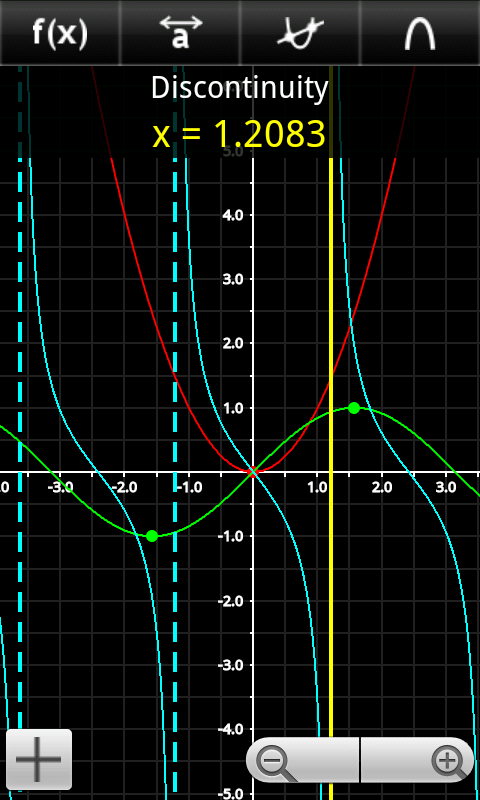
  • Display discontinuities (PRO only)
  • Redesigned menu layout: The last button in the menu bar can know be used to switch the mode while the screenshot dialog has been moved to the menu that appears when you press the menu-button
  • Better performance: Drawing is now done in the background. So, even if you draw many functions on slow devices, you can, for example, still move the coordinate system while the app is redrawing the graphs
  • Much more: This update also includes several bug fixes and minor improvements
Unfortunately, I had to drop the Chinese translation in this update, because it just wasn't up-to-date anymore...

All in all, I think this is a major update. Therefore, I'm really excited to receive your feedback!!!


Sunday, May 15, 2011

Function Inspector one of "Best Mathematical Graph Plotters"

I just found an article from addictivetips.com which compares Function Inspector with 2 more Android graph plotters, AndroPlotter and Grapher.

This is what it says about Function Inspector:

Function Inspector Lite has a few features in addition to those in the other two. However, most of these can only be used to the full in the paid (PRO) version of the application.The app sports only the most essential functions, can plot only one function at a time in the free and up to a maximum of 3 in the paid version. Still, features like the ability to display roots and other special points of plotted functions and three modes of interaction with the graph window namely panning, tracing and slope (PRO version only) modes do indeed make it the “most advanced graphing calculator available on the Market”. Another feature that catches the eye is the real-time update of the graph with every change made in the entered function.
Since it was compared to two free apps I understand the critique that many features are only available in the PRO version. And the fact that the app does not offer a lot of functions will be an incentive for future versions.
All in all, I think this is a pretty good review! Which can be proven by the bottom line of the article:
If you’re all for functionality and are ready to spend some cash, Function Inspector is the way to go.
So far, this was the first review on my app. Please comment if you found more ;)

But for know, I will focus on version 3.0 which will probably launch in 2 weeks!

Friday, April 29, 2011

Function Inspector Web online

I Just added a new Page "Function Inspector Web" to this blog which contains a link the Java Applet of Function Inspector Web.
This is the version that I published as an *.exe file a few days ago.

Please remember that you will need Java in order to run this applet. You will find a download link on this page, too.

Monday, April 25, 2011

Function Inspector coming to Desktops!

I just renamed the title of this blog from "Android-Blog" to "Dev-Blog" because I just finished a very early preview of a Desktop version of Function Inspector:

A very, very early build of Function Inspector Web which will probably be a Java applet in the future.

In fact, this is my very first useful (to some extend) software that is not written for Android. Of course, I was able to reuse all of the functionality because both is written in Java.

As you can see on the screenshot, I chose a layout that is quite similar to how the Android app is structured.

Those are the things that are working:

  • Draw one function: It can draw any function entered in the huge text field. It should also recognize discontinuities like in tan(x)
  • Pan and zoom: Just drag the area and use your mouse wheel to zoom
  • Display roots, extrema and inflection points: It does not return the coordinates, though 
Everything else just won't do anything ;)

I am planning to create a dedicated website and upload it as a Java Applet. For now it is available for you to test it as a Windows *.exe file:

Saturday, April 16, 2011

Function Inspector 2.8

tan(x) and 1/x: Function Inspector 2.8
recognizes asymptotes and eliminates
vertical lines
I just published an update to Function Inspector which includes the following changes:

  • Recognition of Asymptotes: functions like tan(x) or 1/x are no longer drawn with a vertical line
  • No more haptic feedback for the keyboard: A user complained about it and I decided that it is unnecessary. If you found this feature useful, please let me know!
  • Background work: I improved the existing code which should not affect the look and feel that you are used to. If it does, please let me know!
As you can see, Function Inspector is going towards its 3.0 release which will be a major upgrade as I am planning to make some changes to the UI as well as to improve the functionality.

But that's it for now, I hope you'll enjoy the update ;)

Friday, April 1, 2011

Function Inspector 2.7.1

This is a very minor but convenient update:
When the function input menu is opened, the first empty input box is focussed automatically, so you don't have to click in it!

Other than that I've been working on improving the existing code which is hard work that you don't notice, but it might speed up future updates ;)